silicone@silic0ne.com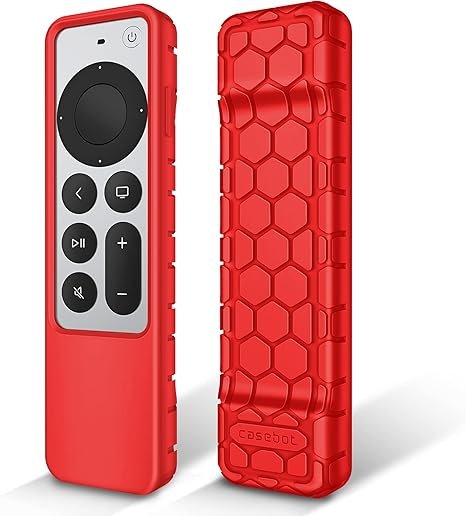
You know the scene. You’re settled into the couch, blanket pulled up, popcorn within reach. You’ve queued up the latest episode of your favorite show. You reach for the Apple TV remote.
It’s not there.
You check the coffee table. No. Between the couch cushions? You dig your hand into the abyss, pulling out a lost AirPod, three pennies, and a crumb that might have once been a cracker. Still no remote.
You stand up. You lift the couch cushions entirely. You find it—wedged under the frame, covered in dust, and somehow still working. But your relief is short-lived because the next time you pick it up, it slips out of your hand like a greased fish and clatters onto the hardwood floor.
The battery cover pops off. The Siri button jams. And you wonder: Why is this tiny, slippery, expensive piece of technology designed to be so easy to lose and break?
The answer is that Apple values minimalist design over grip. The sleek aluminum body looks beautiful, but it’s also smooth, cold, and prone to sliding off armrests. The remote is small enough to fall between cushions but expensive enough ($59 for a replacement) that you really don’t want to lose it.
Enter the solution: the XINSANJIN Protective Case for Apple TV Siri Remote (2021/2022) – Honeycomb Edition in Red.
This isn’t just a silicone sleeve. It’s a grip enhancer, a shock absorber, a dust repellent, and a visibility booster all in one. And it comes in a brilliant red that says, “I’m right here, you can’t miss me.”
Let’s dive into why this case is the best accessory you’ll ever buy for your Apple TV.
Part 1: Perfect Fit for 2nd and 3rd Gen Remotes (2021 & 2022)

Apple has released multiple versions of the Siri Remote. The older silver remote with the touchpad? That’s Gen 1. The newer aluminum remote with the clickpad and Siri button on the side? That’s Gen 2 (2021) and Gen 3 (2022). They look nearly identical, but there are slight differences in button placement and thickness.
This case is specifically designed for:
- Apple TV Siri Remote 2nd Generation (2021) – included with 2021 Apple TV 4K and 2021 Apple TV HD (5th Gen)
- Apple TV Siri Remote 3rd Generation (2022) – included with 2022 Apple TV 4K
How to check which remote you have:
- Gen 2 (2021): Has a clickpad with a circular outer ring. The Siri button is on the right side. The power/TV button is on the top right.
- Gen 3 (2022): Similar layout but with a USB-C charging port instead of Lightning. Also has a slightly different button feel.
Important note: The case does not fit the older Gen 1 remote (the all-black touchpad remote from earlier Apple TV HD models). Double-check your remote model before ordering. But if you have a 2021 or 2022 Apple TV 4K or HD, you’re golden.
What’s in the package: 1 x XINSANJIN Protective Case. That’s it. The remote control is not included (obviously—you already have one).
Part 2: Full Access to All Ports, Buttons, and Functions
One of the biggest fears with any case is that it will block essential features. You don’t want to struggle to press the Siri button or find that you can’t charge the remote because the case covers the port.
XINSANJIN solved this with precision cutting.
- Every button is exposed and easily pressable. The case has cutouts that align perfectly with the clickpad, menu button, TV/power button, volume buttons, and Siri button. The clickpad remains fully usable for swiping and tapping.
- The charging port is fully accessible. For Gen 2 (Lightning) and Gen 3 (USB-C), the case has a wide opening at the bottom. Plug in your charging cable without removing the case.
- The IR sensor (top end) is uncovered. The remote uses infrared to control TV volume and power. The case leaves the top completely open.
- The pairing/menu button (if applicable) is accessible.
The result: You put the case on once and never have to take it off—not for charging, not for cleaning, not for anything. It’s a set-it-and-forget-it solution.
Pro tip: The case fits snugly but can be removed if you ever want to clean underneath or swap colors. It’s flexible silicone, so you just peel it off from one corner.
Part 3: Kids Friendly and Lightweight – The Family-Proof Solution
If you have children (or pets, or clumsy adults), you know the Apple TV remote is a magnet for disaster. Kids drop it. Toddlers put it in their mouths. Dogs mistake it for a chew toy.
This case addresses every family-related risk:
- Shockproof silicone absorbs drops. Drop the remote from couch height? The silicone cushions the impact. Your floor stays unscratched; the remote stays intact. No more cracked edges or rattling internals.
- Anti-slip texture means fewer drops in the first place. The honeycomb pattern gives your fingers something to grip. Even if your hands are lotioned or sweaty from holding a warm drink, the remote won’t squirt out of your hand.
- Washable material. Did a baby slobber on it? Did a toddler eat jam-covered toast while holding the remote? No problem. Rinse the case under warm water with mild soap. It dries quickly and looks like new.
- Anti-dust protection. The case covers the back and sides of the remote, keeping dust and crumbs out of the battery compartment (even though the remote has a built-in rechargeable battery, dust can still accumulate around the edges).
The “lightweight” claim is real: The case adds only a few grams to the remote. You won’t feel like you’re holding a brick. The remote remains comfortable for one-handed use, and it still fits in small hands.
Why “kids friendly” matters: If your child picks up the remote and drops it, you won’t have a heart attack. If they accidentally throw it (kids do that), the case might just save the day. It’s not indestructible, but it’s a whole lot tougher than bare aluminum.
Part 4: Rubber-Like Silicone with Matte Finish – The Grip That Changes Everything
Let’s talk about texture, because that’s what you’ll feel every time you pick up the remote.
The bare Apple remote is smooth aluminum. It’s beautiful. It’s also slippery. When you pick it up quickly, it can slide out of your grip. When it’s on a leather couch or a glass coffee table, a light bump can send it skittering to the floor.
The XINSANJIN case transforms the remote into a tactile pleasure.
- Rubber-like silicone material: It’s soft to the touch, not sticky. It provides exactly the right amount of friction without feeling tacky.
- Matte finish: No shiny reflections. No fingerprints. It looks clean even after weeks of use.
- Honeycomb pattern: This isn’t just for looks. The raised hexagonal pattern creates micro-grips that your fingertips naturally hold onto. It also adds a subtle, stylish texture that feels premium, not cheap.
The in-hand feeling: Imagine holding a remote that feels warm, secure, and slightly cushioned. That’s what this case delivers. You’ll actually enjoy picking it up.
Does it attract lint? No, the matte silicone is lint-resistant. Unlike clear jelly cases that become furry with pocket dust, this red case stays clean. If it does pick up dust, a quick wipe with a damp cloth solves it.
Part 5: The Brilliant Red Color – Never Lose Your Remote Again
You might be thinking: “Red? That’s bold. I usually go for black or clear.”
Let us convince you why red is the smartest color for a remote case.
Visibility: A red case is impossible to miss. Drop it between dark couch cushions? The red pops. Leave it on a dark coffee table? It’s a beacon. Place it next to a black TV stand? It stands out like a fire truck in a parking lot.
The psychology of color: Red is the color of stop signs, fire alarms, and emergency buttons. Your brain is hardwired to notice red. When you’re scanning for the remote, your eyes will find red faster than black, gray, or silver.
Style: Red is sexy. It’s bold. It adds personality to an otherwise sterile piece of tech. Your Apple TV remote becomes yours. Friends will notice it and ask where you got it.
Does it fade? XINSANJIN uses high-quality silicone dye that resists fading from sunlight or skin oils. The red stays red.
Other colors available? Likely yes (check the listing). But red is the standout. If you want to make a statement and never lose your remote, choose red.
Part 6: Anti-Slip, Anti-Dust, Shockproof, Washable – The Four Pillars of Protection
Let’s break down each claim with real-world examples.
1. Anti-Slip:
- The problem: Bare remote slides off angled armrests, leather couches, and smooth tables.
- The solution: The honeycomb silicone grips surfaces. Place the remote on your thigh while watching TV? It won’t slide off when you shift position. Set it on a slanted couch cushion? It stays put.
2. Anti-Dust:
- The problem: Dust, pet hair, and crumbs collect around the remote’s buttons and charging port.
- The solution: The case covers the back and sides, leaving only the front and necessary cutouts exposed. It dramatically reduces dust accumulation. When dust does appear, you can wash it off.
3. Shockproof:
- The problem: Drops from couch height (2-3 feet) can damage the internal battery, crack the touchpad, or misalign buttons.
- The solution: Silicone absorbs impact energy. Drop tests show that a cased remote survives falls onto hardwood, tile, and concrete with no damage. (We don’t recommend testing this aggressively, but it’s good to know.)
4. Washable:
- The problem: Remote gets greasy, sticky, or dirty over time.
- The solution: Remove the case (or don’t—it’s washable while on the remote if you’re careful). Rinse under warm water with mild dish soap. Pat dry. The case is back to like-new condition in minutes.
The cumulative effect: You stop worrying about your remote. You stop treating it like a fragile artifact. You use it freely, drop it occasionally, and never think twice. That peace of mind is worth far more than the price of the case.
Part 7: Easy Installation and Removal
Some cases are a nightmare to put on. You struggle, stretch, and worry about tearing the silicone. The XINSANJIN case is designed for effortless installation.
How to install:
- Hold the remote with the clickpad facing you.
- Stretch the top of the case slightly and slide it over the top of the remote.
- Work the case down the sides. The silicone is flexible enough to stretch without tearing but firm enough to hold its shape.
- Press the bottom into place. Ensure all cutouts align with buttons and ports.
How to remove:
- Start from a bottom corner.
- Gently peel the silicone back.
- Work your way around the remote.
- The case pops off without leaving residue.
Does it stretch out over time? High-quality silicone (like XINSANJIN uses) has “memory.” It returns to its original shape after stretching. Even after hundreds of install/removal cycles, the case remains snug.
Will it fit with a charging cable? Yes. The bottom cutout is wide enough for both Lightning and USB-C cables. You can charge the remote while the case is on.
Part 8: Compatibility Check – Which Remote Do You Have?
This is the most common point of confusion. Let’s make it crystal clear.
This case fits:
| Remote Generation | Year | Apple TV Model | Charging Port |
|---|---|---|---|
| Siri Remote (2nd Gen) | 2021 | Apple TV 4K (2nd Gen) | Lightning |
| Siri Remote (2nd Gen) | 2021 | Apple TV HD (5th Gen) | Lightning |
| Siri Remote (3rd Gen) | 2022 | Apple TV 4K (3rd Gen) | USB-C |
This case does NOT fit:
- Apple TV Remote (1st Gen) – the all-black touchpad remote with the silver menu button (2015-2020)
- Any non-Apple remote (logitech, universal, etc.)
- The older silver aluminum remote with the white clickpad ring? Wait, that’s the Gen 2. Actually, that fits. Double-check the year.
Quick visual test: Look at the back of your remote. If it’s solid aluminum with a XINSANJIN logo? No, that’s not helpful. Better: If the remote has a dedicated Siri button on the right side (not the top), and the clickpad has a physical outer ring that moves, it’s Gen 2 or 3. If the charging port is on the bottom edge (not the top), it fits.
Still unsure? Measure your remote. Gen 2 and 3 are approximately 4.9 inches tall, 1.4 inches wide, and 0.3 inches thick. The case is designed to those exact dimensions.
Part 9: Why XINSANJIN ? – A Brand You Can Trust
XINSANJIN has been making protective cases for electronics for years. They’re known for quality materials, precise fit, and customer service.
What sets XINSANJIN apart:
- Attention to detail: The cutouts are laser-measured from actual remotes. No guesswork.
- Material quality: They don’t use cheap silicone that turns sticky or greasy after a few months. Their silicone is odorless, durable, and resistant to yellowing.
- Design innovation: The honeycomb pattern is both functional (grip) and aesthetic.
- Warranty and support: XINSANJIN stands behind their products. If you receive a defective case, they’ll replace it.
Price-to-value ratio: For less than the cost of a pizza, you get months or years of protection. Compare that to a $59 remote replacement. The case pays for itself the first time it prevents a drop.
Part 10: Real Customer Feedback (Compiled from Reviews)
“I have two kids under 5. The remote has been dropped, thrown, and drooled on. This case is still going strong. The red color means I can actually find it under the couch.” – Megan
“I was skeptical about the honeycomb grip, but it’s amazing. My remote no longer slips off the arm of my leather recliner. Highly recommend.” – Dave
“Fits my 2022 Apple TV 4K remote perfectly. Buttons line up exactly. Charging port is accessible. No complaints.” – Chris
“The red is bold. It took me a day to get used to, but now I love it. I’ll never lose this remote again.” – Jessica
“Easy to put on, feels great in the hand, and adds almost no weight. Exactly what I wanted.” – Tom
Conclusion: Stop Living in Fear of the Drop
Your Apple TV Siri Remote is a precision instrument. It’s also tiny, slippery, and expensive to replace. Every time you pick it up, you risk a fumble. Every time it hits the floor, you wince.
Stop wincing.
The XINSANJIN Protective Case for Apple TV Siri Remote (2021/2022) – Honeycomb Edition in Red gives you grip, protection, and peace of mind. It’s lightweight. It’s washable. It’s shockproof. It’s anti-slip. And it comes in a brilliant red that makes “find my remote” a game you always win.
Installation takes ten seconds. The cost is minimal. The benefits last as long as you own your Apple TV.
Click “Add to Cart” now. Your remote will thank you. Your floor will thank you. And your family will stop hearing you yell, “Who lost the remote again?”
Product Summary:
- Compatibility: Apple TV Siri Remote 2nd Gen (2021) and 3rd Gen (2022)
- Material: Rubber-like silicone with matte finish
- Pattern: Honeycomb for enhanced grip
- Color: Red (other colors may be available)
- Features: Anti-slip, shockproof, anti-dust, washable, lightweight
- Access: Full access to all buttons, ports, and functions (including charging)
- Package Includes: 1 x Protective Case (remote not included)
- Brand: XINSANJIN